Retail scheduling
Employee scheduling for small retail shops
A small shop runs on coverage: an opener with keys, the Saturday afternoon rush, the Thursday delivery, and a part-time, seasonal crew whose availability changes with the school year. Daypart makes the weekly build quick, keeps availability straight, and puts the schedule on everyone's phone — without an enterprise workforce platform.
Build the week around your busy hours, bring seasonal hires on before they've even accepted the invite, and let staff claim open shifts and request swaps from the app. Publish once and the floor knows the plan.
- Sales associate
- Cashier
- Stock
- Key holder
- Manager
Built for how retail shops actually run.
Saturday afternoon with one person on the floor
See coverage by day and role so the busy afternoons and weekends are staffed, and fill the thin spots with open shifts anyone on the team can claim from their phone.
Holiday hiring and the new semester
Invite seasonal hires and schedule them before they accept. Students and part-timers keep a weekly availability pattern and change it when classes do; the builder flags a shift outside it before you publish. When the season ends, removing someone keeps their history, and re-inviting the same email brings them back.
“Can I have Black Friday off?” in a text
Time-off requests go in the app, for whole or partial days. You approve or deny from one queue with an undo and a full history, and approved time off shows on the schedule so you don't book over it.
A printed schedule that's already out of date
Publish and the floor gets it on their phones — email, push on iPhone, or the in-app feed — and every edit after that goes out too. A print-friendly week or month still works for the stockroom door.
How it works
Set up once. Run it every week.
About 10 minutes from sign-up to a published first week for a single-location shop. After that, it's the same four moves every week.
Add the floor and the key holders
Invite sales associates, cashiers, stock and key holders by email; a seasonal hire can be scheduled before they accept. Roles get colors, so you can see at a glance who can open and close.
Collect availability from students and part-timers
Each person sets a weekly pattern and updates it when their classes or their other job change. The builder flags a shift outside it before you publish.
Build around your busy hours, then copy the week
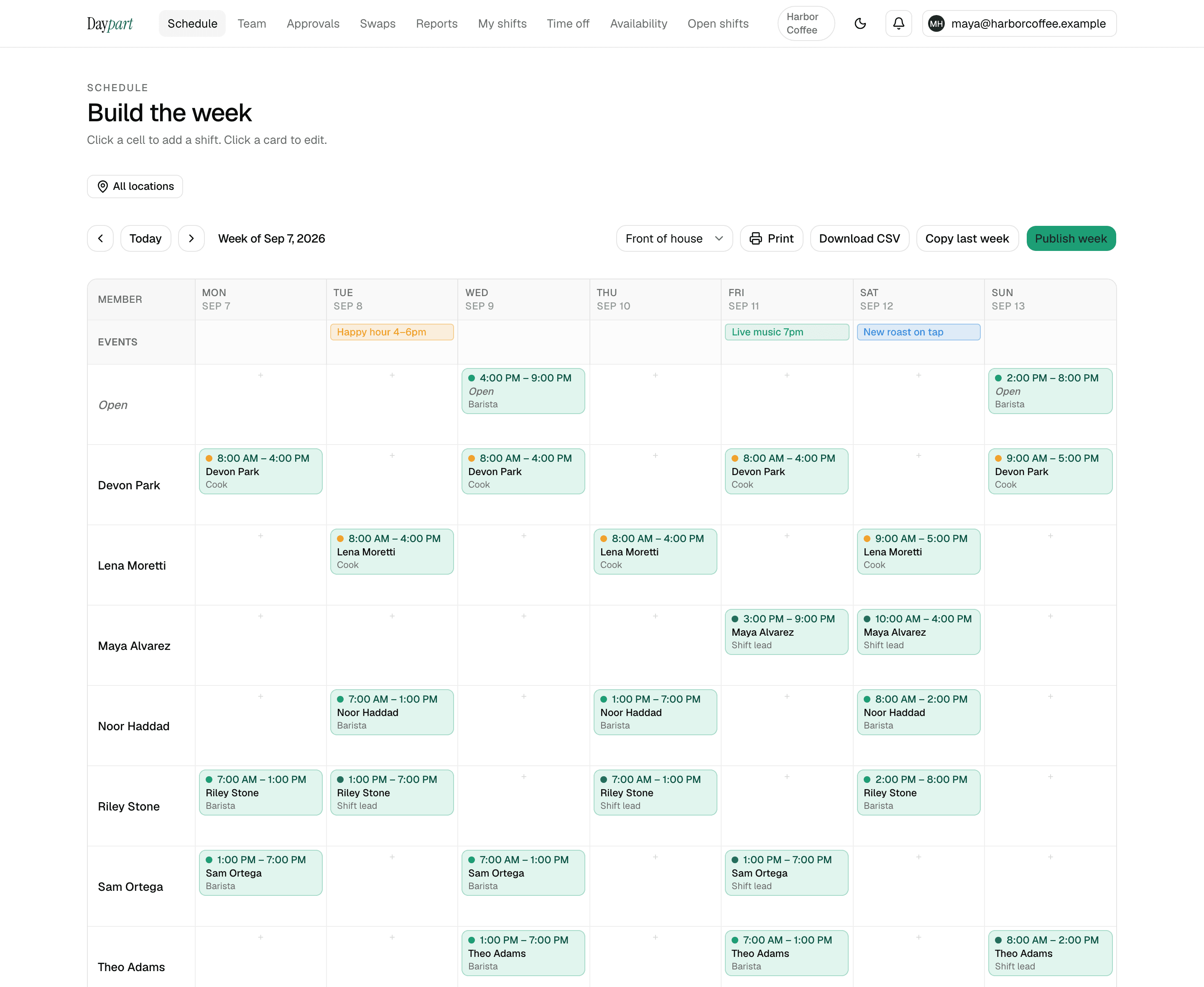
Drag shifts onto the grid where the foot traffic is — the Saturday afternoon rush, the Thursday delivery — and pin a sale or a holiday on the events row. Copy last week when nothing much changed.
Publish and let the floor fill its own gaps
Everyone scheduled gets the week on their phone. An uncovered shift goes up as open and the first person to claim it has it; swap and time-off requests wait in one approvals queue with an undo.
Pricing
One flat price. Everything included.
30 days free with the full Team plan and no credit card, then $20 a month — the same for 3 people as for 75, across up to 10 locations. When the trial ends the account goes read-only until you upgrade; nothing is deleted.
- Open shifts anyone on the team can claim — first tap wins
- Swaps, trades and time off, approved from one queue with an undo and a full history
- Availability, conflict warnings, copy last week, publish in a tap
- Hours report, overtime heads-up, payroll-ready CSV, iOS app for the crew
Retail — FAQ
Common questions
Is Daypart a good scheduling app for a small retail store?
Yes — it's built for small teams and covers the retail basics: availability, open shifts, swaps, time-off approvals, a print view and a mobile app. Most small shops are live in about 10 minutes.Can it handle seasonal and part-time staff?
Yes. Add people as you hire — they can be scheduled before they accept the invite — and collect their availability. The price stays flat up to 75 people, and removing someone at the end of the season keeps their shifts in your history.Can I make sure a key holder opens and closes?
Roles are colors on the grid, so you can see at a glance who's on an open or a close. An open shift can be claimed by anyone on the team, though — there's no role check — so assign opens and closes to key holders directly rather than posting them as open.Does Daypart include a time clock?
No. Daypart is scheduling-only and doesn't include a time clock or payroll. Export scheduled hours as a CSV for the tools you already use.Will it work on my staff's phones?
Yes. There's a native iOS app for iPhone and iPad; on Android, the web app works in any browser and can be added to the home screen. Everyone sees their shifts, open shifts to claim, and their own requests.
Scheduling guides for other industries: restaurants, bars, cafés, salons, and cleaning companies
Your next Sunday, handled
Stop wrangling spreadsheets.
Try Daypart free for 30 days — full Team features, no credit card. When the trial ends, keep going for $20/mo. Cancel anytime; your data is always yours.
- 30-day free trial — full Team features
- iOS app for the crew — on the App Store
- Cancel anytime — your data is yours