Restaurant scheduling
Restaurant staff scheduling, without the 4 p.m. scramble
A restaurant week is front and back of house on one grid, doubles, a close that crosses midnight, and the call-out that lands an hour before the dinner rush. Daypart keeps all of it in one place — without bolting on payroll, hiring and an HR suite you didn't ask for.
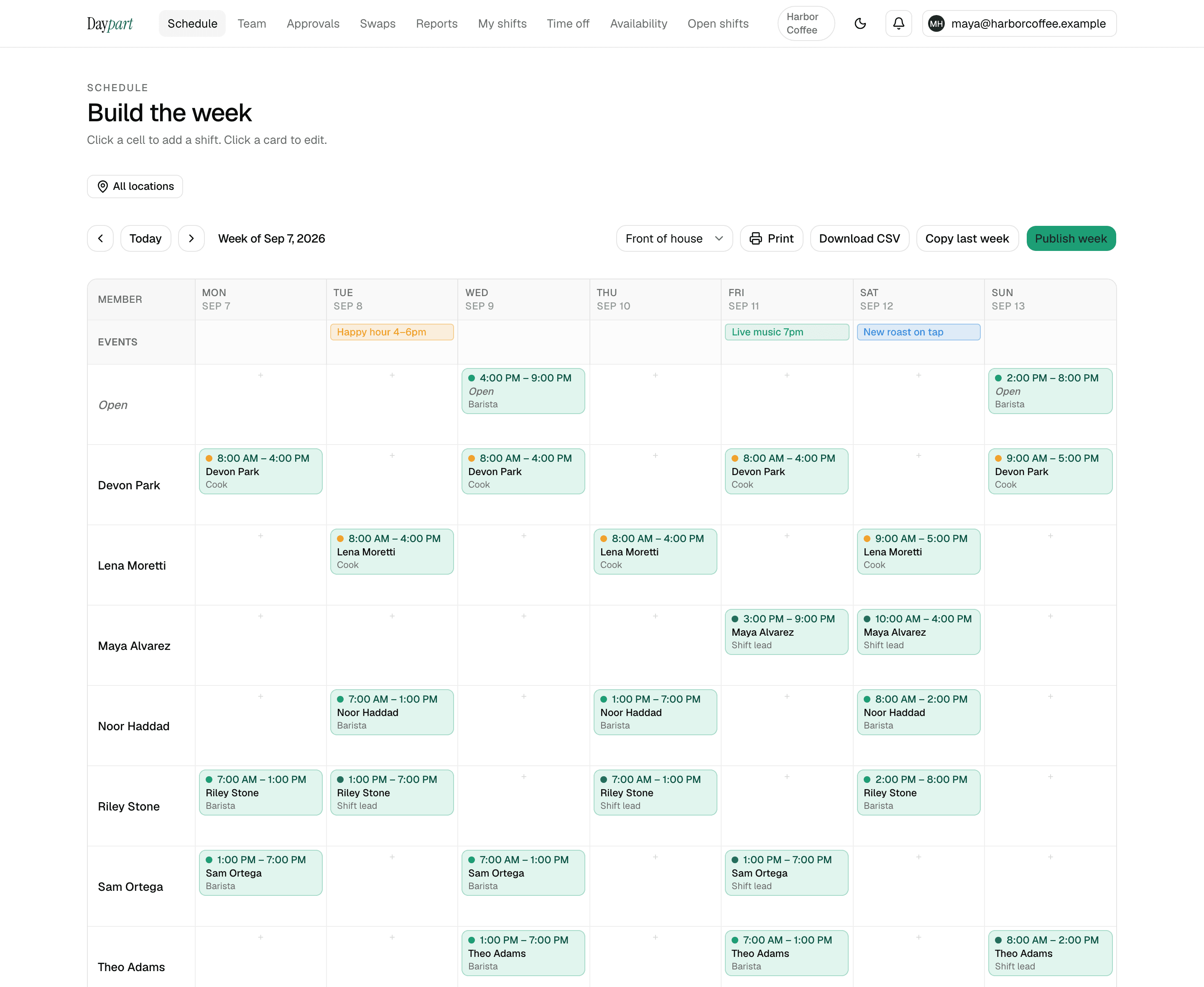
Drag the week together, give servers, cooks, hosts and bartenders their own colors, and publish in a tap. When someone calls out, post the shift as open and anyone on the team can claim it from their phone — first tap wins, and the group text stays quiet.
- Server
- Line cook
- Host
- Bartender
- Dishwasher
Built for how restaurants actually run.
Someone calls out at 4 p.m.
Un-assign the shift and it's an open shift on the published schedule, in the Open Shifts list everyone can see. Whoever wants it taps Claim; the first tap wins and the schedule updates for everyone. A one-line nudge — “Friday dinner is open in the app” — replaces six individual texts.
Front and back of house on two different sheets
One schedule, color-coded by role, so a Saturday with five servers and one cook on the line shows up on Sunday night instead of at 7 p.m. Saturday.
Doubles, splits and the 2 a.m. close
A lunch-and-dinner double is just two shifts; only an overlap gets flagged. A 6 p.m. to 2 a.m. close stays on the day it starts. Nobody fights the tool to enter a normal restaurant shift.
“Can I swap Saturday?” in the group chat
A server requests a drop or proposes a trade with a teammate from their phone. You approve with a seven-second undo and a full decision history, and an approved trade reassigns both shifts on its own.
How it works
Set up once. Run it every week.
About 10 minutes from sign-up to a published first week for a single-location shop. After that, it's the same four moves every week.
Set up front and back of house as roles
Invite servers, hosts, bartenders, line cooks and dishwashers by email; each role gets a color, so one grid shows both sides of the pass.
Collect availability from the whole staff
Each person sets the days and hours they can work, with more than one window a day for the lunch-and-dinner crowd. The builder flags a shift that lands outside them, or on approved time off, before you publish.
Build the week to the rush
Drag shifts onto the grid: a lunch double, a 6 p.m. to 2 a.m. close, a short mid during the Friday push. A double is just two shifts; only an overlap gets flagged. Copy last week when the backbone doesn't change.
Publish and handle the changes in one place
Everyone scheduled gets the week on their phone. A call-out becomes an open shift anyone on the team can claim, first tap wins; a server who proposes a trade with a teammate sends it to your approvals queue, where one tap reassigns both shifts.
Pricing
One flat price. Everything included.
30 days free with the full Team plan and no credit card, then $20 a month — the same for 3 people as for 75, across up to 10 locations. When the trial ends the account goes read-only until you upgrade; nothing is deleted.
- Open shifts anyone on the team can claim — first tap wins
- Swaps, trades and time off, approved from one queue with an undo and a full history
- Availability, conflict warnings, copy last week, publish in a tap
- Hours report, overtime heads-up, payroll-ready CSV, iOS app for the crew
Restaurants — FAQ
Common questions
Is Daypart a good scheduling app for a small restaurant?
Yes. It's built for owner-run teams of 3–75 people and handles restaurant realities — front- and back-of-house roles, doubles, open shifts, swaps, time off and overnight closes. A five-person shop is usually live in about 10 minutes.Can servers swap shifts themselves?
A server can request a drop, or propose a trade with a specific teammate, from their phone. A manager approves it — with a seven-second undo and a full history — and an approved trade reassigns both shifts automatically. The named teammate isn't asked to accept in the app, so agree the trade first.Can I limit an open shift to cooks, or require approval before someone takes it?
No. Any member of the team can claim an open shift, and the first tap wins — there's no approval step and no role check. If a line-cook shift should only go to someone who has run that station, assign it directly rather than posting it as open.Does Daypart handle tips, POS integration or a time clock?
No. Daypart is scheduling-only — no tip pooling, no POS connection, no time clock. If those are essential, a restaurant platform such as 7shifts is the better fit; if you just need the schedule built and in everyone's hands, Daypart is simpler and cheaper.Can I print the schedule for the back of house?
Yes — a print-friendly weekly and monthly view, with a density toggle for a poster or a handout.
Scheduling guides for other industries: bars, cafés, salons, cleaning companies, and retail shops
Your next Sunday, handled
Stop wrangling spreadsheets.
Try Daypart free for 30 days — full Team features, no credit card. When the trial ends, keep going for $20/mo. Cancel anytime; your data is always yours.
- 30-day free trial — full Team features
- iOS app for the crew — on the App Store
- Cancel anytime — your data is yours