Bar & brewery scheduling
Scheduling for bars and breweries, without the late-night chaos
Bars and taprooms don't run on a steady week. Thursday is quiet until it isn't, Saturday needs three behind the bar and a barback, the release party needs everyone, and the close runs past 2 a.m. Daypart is built for that rhythm: overnight shifts stay on the night they start, the events row marks the nights that need extra hands, and there's no HR platform to babysit.
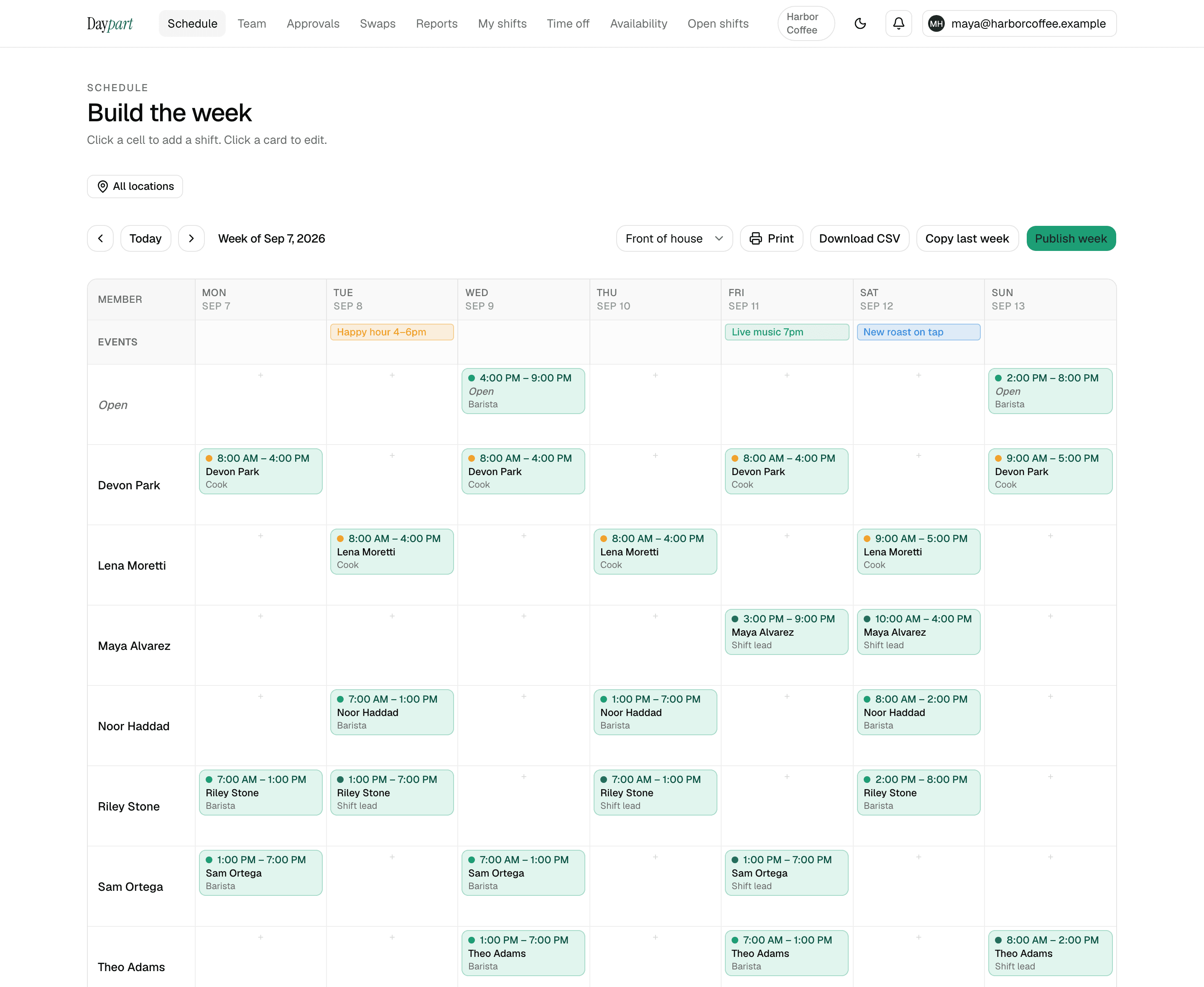
Build the weekend, post the shifts nobody has as open shifts, and let bartenders and barbacks claim them from their phones. Publish once and everyone gets the update — no screenshot in the group chat, no “who's closing Saturday?” at 4 p.m.
- Bartender
- Barback
- Server
- Door / security
- Taproom lead
Built for how bars actually run.
Closes that run past 2 a.m.
Schedule a 7 p.m. to 3 a.m. shift and it stays on the night it starts — on the grid, on the crew's phones and in the hours report. No splitting a close across two days, no fighting the tool.
Nights that don't look like last week
A quiet Tuesday, a packed Saturday, a release party Friday. Build each night to what it needs, pin the DJ night or the private party on the events row so the crew sees why Friday is heavier, and copy last week only when it fits.
The bartender–barback mix
Give bartenders, barbacks, servers and door staff their own colors so a thin Saturday behind the bar shows up before service, not during it. One honest note: an open shift can be claimed by anyone on the team, so for a shift only a bartender should take, assign it directly or say so in the shift note.
A crew that trades shifts constantly
A bartender drops a shift or proposes a trade with a teammate from their phone; you approve it with a seven-second undo and a full history. Nobody's keeping score in the group chat.
How it works
Set up once. Run it every week.
About 10 minutes from sign-up to a published first week for a single-location shop. After that, it's the same four moves every week.
Add the crew and their roles
Invite bartenders, barbacks, servers and door staff by email and give each role a color. The regular who covers busy Saturdays but won't make an account goes on the roster as a guest, no login needed.
Collect availability once
Everyone sets the nights they can work from their phone — a bartender with a day job marks Thursday to Sunday. The builder warns you before you publish a shift outside anyone's window.
Build the week, then copy it
Drag shifts onto the grid, including a 7 p.m. to 3 a.m. close that stays on the night it starts. Pin trivia night or the release party on the events row. Next week, copy last week and change only what changed.
Publish, then let the crew fill the gaps
One tap puts the week on everyone's phone. A shift nobody has goes up as open and the first person to claim it takes it; a dropped shift or a proposed trade lands in your approvals queue with a seven-second undo.
Pricing
One flat price. Everything included.
30 days free with the full Team plan and no credit card, then $20 a month — the same for 3 people as for 75, across up to 10 locations. When the trial ends the account goes read-only until you upgrade; nothing is deleted.
- Open shifts anyone on the team can claim — first tap wins
- Swaps, trades and time off, approved from one queue with an undo and a full history
- Availability, conflict warnings, copy last week, publish in a tap
- Hours report, overtime heads-up, payroll-ready CSV, iOS app for the crew
Bars — FAQ
Common questions
Can Daypart schedule shifts that go past midnight?
Yes. A close that runs from 8 p.m. to 3 a.m. is one shift, anchored to the night it starts, on the schedule and in the hours report.Does it work for a brewery taproom as well as a bar?
Yes. A taproom crew schedules like a bar crew — variable nights, event nights, a mix of bartenders and barbacks — and that's what the schedule builder, open shifts and the events row are built for. Daypart doesn't track production or inventory; it schedules the people.Can I limit an open shift to bartenders only?
No. Any member of the team can claim an open shift, and the first tap wins — there's no approval step and no role check on a claim. For a shift that must go to a bartender, assign it directly rather than posting it as open. Swaps and trades, by contrast, always go through a manager.Is there a mobile app for bartenders?
Yes — a native iOS app for iPhone and iPad shows the next shift, lists open shifts to claim, and lets the crew request swaps and time off. There's no Android app; the web app works in any phone's browser.Does Daypart do tip-outs or payroll?
No. Daypart is the scheduler only — no tip management, time clock or payroll. Export scheduled hours as a CSV for the payroll tool you already use.
Scheduling guides for other industries: restaurants, cafés, salons, cleaning companies, and retail shops
Your next Sunday, handled
Stop wrangling spreadsheets.
Try Daypart free for 30 days — full Team features, no credit card. When the trial ends, keep going for $20/mo. Cancel anytime; your data is always yours.
- 30-day free trial — full Team features
- iOS app for the crew — on the App Store
- Cancel anytime — your data is yours